
WinRAR repair software
How to extract files from a damaged WinRAR archive
Step-by-step instructions for repairing data from damaged RAR archives of all versions. Extracting information from RAR files whose size is not more than 4GB:
- Download, install and open the RAR Repair Toolbox tool from the site: https://www.fix-toolbox.com/download/RARRepairToolboxInstall.exe.
- Select a corrupted RAR archive.
- Select the files and folders you want to save.
- Select a folder to save the extracted data.
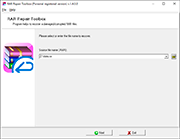


How to repair a corrupt RAR file? RAR Repair Toolbox helps to check incorrect *.rar archive and extract files from a bad archive to HDD. RAR Repair Toolbox helps to repair WinRAR archives of all the versions.
Features of RAR repair tool:
- Restore all types of WinRAR archive.
- Fix WinRAR self-extracting SFX archives.
- Recover multi-volumes WinRAR archives.
- Repair files with incorrect CRC values.
- Selective saving of restored files.
- Supports archives larger than 2 GB.
- Compatible with Windows 98/NT 4.0/2000/Me/XP/Vista/7/8/8.1/10.
- Repair files with incorrect headers (error: the file ??? header is corrupt).
Note: RAR Repair Toolbox software is offered by the professional software team development of fix-toolbox.com and can be Downloaded for free without some kind of additional provisions. Unlike freeware, open source programs and GNU General Public License (GPL) applications, RAR Repair Toolbox is covered by its own license agreement. Freeware version of RAR Repair Toolbox is available for anyone and there are no restrictions for the time of evaluation. Do not need donate for RAR Repair Toolbox.
System requirements: Windows 98 and above